
Managing User Sessions in a Multi-Threaded Web Application with Redis and ThreadLocal
In the dynamic world of web applications, efficient session management is crucial for maintaining user state and ensuring a smooth user experience. One effective approach combines the in-memory speed of Redis with the thread-specific storage capabilities of ThreadLocal in Java. This blog will walk you through the process of setting up this powerful duo for session management in a real-world e-commerce scenario.
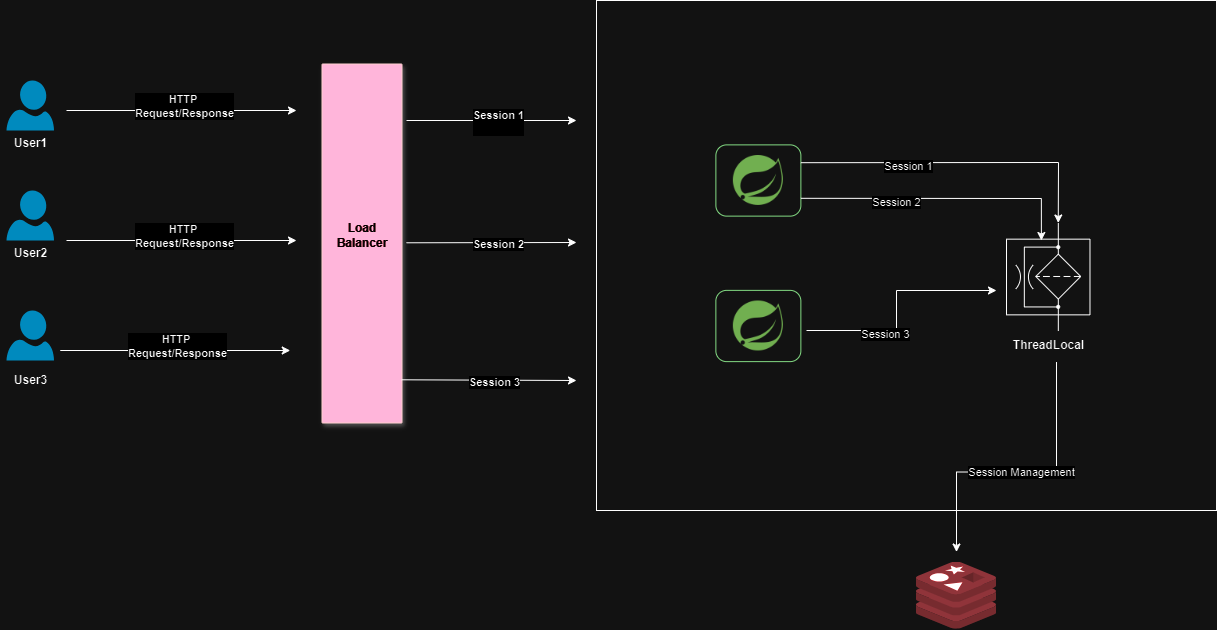
Why Redis and ThreadLocal?
Redis is renowned for its blazing-fast performance as an in-memory data store, making it an excellent choice for session storage where speed and reliability are paramount.
ThreadLocal, on the other hand, provides thread-local variables in Java, allowing each thread to maintain its own session state. This is particularly useful in multi-threaded environments like web servers where each request is handled by a separate thread.
Setting Up the Environment
Before diving into the code, ensure you have Redis installed and running on your machine. If you haven't set up Redis yet, you can download and install it from the official website.
Prerequisites
- Spring Boot 3
- JDK 21
- Redis
Step-by-Step Implementation
- Set up Redis
Ensure Redis is installed and running on your machine.
- Add Dependencies
Add the necessary dependencies to your build.gradle if you are using Gradle.
dependencies {
    implementation 'org.springframework.boot:spring-boot-starter-data-redis'
    implementation 'redis.clients:jedis:4.3.1'
    implementation 'org.springframework.boot:spring-boot-starter-web'
}
If you are using Maven, add these dependencies to your pom.xml.
<dependencies>
    <dependency>
        <groupId>org.springframework.boot</groupId>
        <artifactId>spring-boot-starter-data-redis</artifactId>
    </dependency>
    <dependency>
        <groupId>redis.clients</groupId>
        <artifactId>jedis</artifactId>
        <version>4.3.1</version>
    </dependency>
    <dependency>
        <groupId>org.springframework.boot</groupId>
        <artifactId>spring-boot-starter-web</artifactId>
    </dependency>
</dependencies>- Configure Redis
Create a Redis configuration class to set up the Redis connection.
package com.example.demo.config;

import org.springframework.context.annotation.Bean;
import org.springframework.context.annotation.Configuration;
import org.springframework.data.redis.connection.RedisConnectionFactory;
import org.springframework.data.redis.connection.jedis.JedisConnectionFactory;
import org.springframework.data.redis.core.RedisTemplate;
import org.springframework.data.redis.serializer.StringRedisSerializer;
import redis.clients.jedis.JedisPoolConfig;

@Configuration
public class RedisConfig {

    @Bean
    public RedisConnectionFactory redisConnectionFactory() {
        JedisPoolConfig poolConfig = new JedisPoolConfig();
        poolConfig.setMaxTotal(128);
        return new JedisConnectionFactory(poolConfig);
    }

    @Bean
    public RedisTemplate<String, Object> redisTemplate() {
        RedisTemplate<String, Object> template = new RedisTemplate<>();
        template.setConnectionFactory(redisConnectionFactory());
        template.setKeySerializer(new StringRedisSerializer());
        template.setValueSerializer(new StringRedisSerializer());
        return template;
    }
}- Create a Session Manager Using ThreadLocal
Create a SessionManager class that uses ThreadLocal to manage the session ID.
package com.example.demo.session;

public class SessionManager {
    private static final ThreadLocal<String> sessionThreadLocal = new ThreadLocal<>();

    public static void setSessionId(String sessionId) {
        sessionThreadLocal.set(sessionId);
    }

    public static String getSessionId() {
        return sessionThreadLocal.get();
    }

    public static void removeSessionId() {
        sessionThreadLocal.remove();
    }
}- Create a Session Service to Interact with Redis
Create a service class that interacts with Redis to manage session data.
package com.example.demo.service;

import org.springframework.beans.factory.annotation.Autowired;
import org.springframework.data.redis.core.RedisTemplate;
import org.springframework.stereotype.Service;

@Service
public class SessionService {

    @Autowired
    private RedisTemplate<String, Object> redisTemplate;

    public void setSessionData(String sessionId, String key, String value) {
        redisTemplate.opsForHash().put(sessionId, key, value);
    }

    public String getSessionData(String sessionId, String key) {
        return (String) redisTemplate.opsForHash().get(sessionId, key);
    }

    public void invalidateSession(String sessionId) {
        redisTemplate.delete(sessionId);
    }
}- Implement a Filter to Manage Session Lifecycle
Create a filter that manages the session lifecycle, setting and removing the session ID in ThreadLocal.
package com.example.demo.filter;

import com.example.demo.session.SessionManager;
import com.example.demo.service.SessionService;
import org.springframework.beans.factory.annotation.Autowired;
import org.springframework.stereotype.Component;

import javax.servlet.*;
import javax.servlet.http.HttpServletRequest;
import javax.servlet.http.HttpServletResponse;
import java.io.IOException;

@Component
public class SessionFilter implements Filter {

    @Autowired
    private SessionService sessionService;

    @Override
    public void doFilter(ServletRequest request, ServletResponse response, FilterChain chain) throws IOException, ServletException {
        HttpServletRequest httpRequest = (HttpServletRequest) request;
        HttpServletResponse httpResponse = (HttpServletResponse) response;

        String sessionId = httpRequest.getSession().getId();
        SessionManager.setSessionId(sessionId);

        // Example: Set some session data
        sessionService.setSessionData(sessionId, "user", "JohnDoe");

        try {
            chain.doFilter(request, response);
        } finally {
            SessionManager.removeSessionId();
        }
    }

    @Override
    public void init(FilterConfig filterConfig) throws ServletException {
    }

    @Override
    public void destroy() {
    }
}- Register the Filter
Register the filter in your Spring Boot application.
package com.example.demo;

import com.example.demo.filter.SessionFilter;
import org.springframework.boot.SpringApplication;
import org.springframework.boot.autoconfigure.SpringBootApplication;
import org.springframework.boot.web.servlet.FilterRegistrationBean;
import org.springframework.context.annotation.Bean;

@SpringBootApplication
public class DemoApplication {

    public static void main(String[] args) {
        SpringApplication.run(DemoApplication.class, args);
    }

    @Bean
    public FilterRegistrationBean<SessionFilter> loggingFilter() {
        FilterRegistrationBean<SessionFilter> registrationBean = new FilterRegistrationBean<>();
        registrationBean.setFilter(new SessionFilter());
        registrationBean.addUrlPatterns("/*");

        return registrationBean;
    }
}
Conclusion
By leveraging Redis and ThreadLocal in a Spring Boot 3 application, you can efficiently manage user sessions in a multi-threaded environment. Redis provides fast and reliable session storage, while ThreadLocal ensures thread-safe handling of session data. This setup enhances performance and scalability, making it ideal for modern web applications.
Implementing this approach in your Spring Boot application not only simplifies session management but also ensures a seamless user experience. Happy coding!