
Introduction to Spring Security Architecture
Spring Security is a powerful and highly customizable security framework that provides comprehensive security solutions for Java-based applications. It is a part of the larger Spring ecosystem and seamlessly integrates with other Spring modules. Spring Security is a framework that focuses on providing both authentication and authorization to Java applications
Spring Security acts as a vigilant guardian for your web applications. It oversees who can access your site, verifies user identities, and enforces rules to safeguard your data from unauthorized access.
Authentication And Authorization
- Authentication in web applications
Authentication is the process of verifying the identity of a user accessing a system or application.
- How Spring Security handles authentication
Spring Security handles authentication by employing various authentication providers, such as in-memory authentication, JDBC-based authentication, and LDAP authentication. Each provider validates user credentials and establishes the user’s identity within the application.
- Concept of authorization
Authorization determines what actions a user is allowed to perform within an application. It establishes rules and permissions for accessing protected resources based on the user’s identity and assigned roles.
How DispatcherServlet works with Spring Security
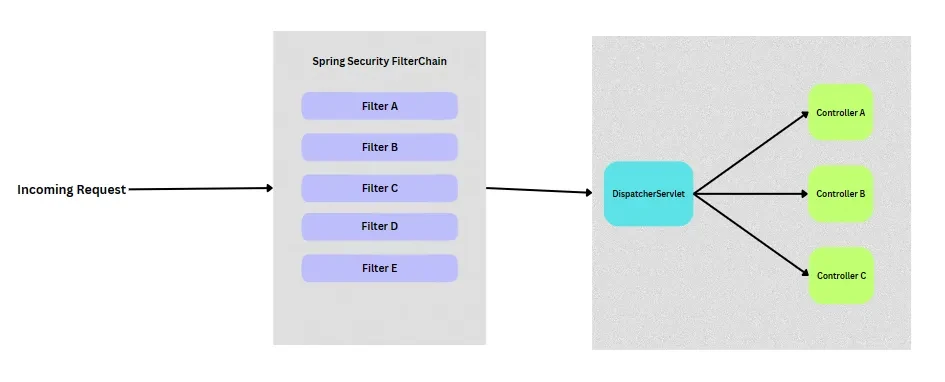
In Spring MVC, all incoming HTTP requests are channeled through a single servlet known as the DispatcherServlet. This servlet directs these requests to your controller classes, where you define the endpoints for your application. Spring Security steps in at this point by introducing filter classes before the HTTP requests reach the DispatcherServlet.
This means that every incoming request will pass through these filter classes one by one. This approach allows us to verify authentication and authorization states before the request reaches the DispatcherServlet and subsequently the controllers. In essence, this is the core function of Spring Security.
Spring Security Architecture
Security Filter Chain
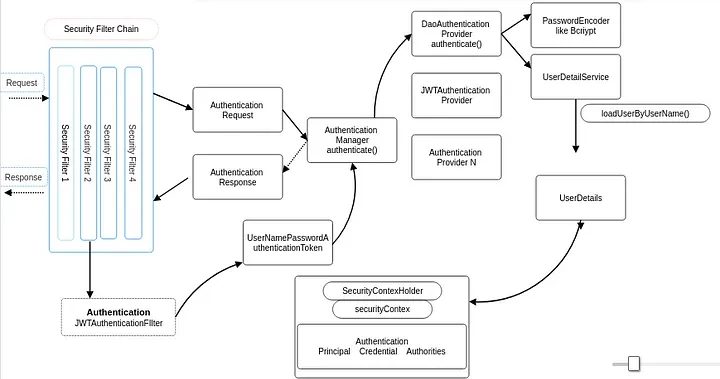
The Security Filter Chain is the backbone of Spring Security. It’s a series of filters that processes incoming HTTP requests and communicates with the Authentication Manager for the validation of requests.
These filters work together to ensure that your web application is secure and responsible for tasks like authentication, authorization, session management and more. These filters work together to ensure that your web application is secure and responsible for tasks like authentication, authorization, session management and more
List of default Filters in Security Filter Chain
ChannelProcessingFilter — ensures protocol such as HTTP or HTTPS.
SecurityContextPersistenceFilter — ensures the user’s authentication details persist during their session.
UsernamePasswordAuthenticationFilter — checks the provided credentials and creates an
Authentication Objectif they are valid.ConcurrentSessionFilter — control how many sessions a user can have and handle scenarios where a user exceeds the session limit.
LogoutFilter — intercepts logout requests and terminates the user’s session
RememberMeAuthenticationFilter — allow user to be remembered across sessions, even after logout.
AnonymousAuthenticationFilter — responsible for creating an anonymous user who is not authenticated but has limited access to some parts of the application.
SessionManagementFilter — handles invalidating sessions, session fixation protection, and other session-related tasks.
ExceptionTranslationFilter — responsible for translating the exception into a unauthenticated response.
FilterSecurityInterceptor — ensures the user have the necessary roles and permissions to access specific resources.
You can read more about filters here.
@Bean
public SecurityFilterChain securityFilterChain(HttpSecurity httpSecurity) {
    httpSecurity.authorizeHttpRequests(authorize ->
          authorize.requestMatchers("/signup/").permitAll()
                   .requestMatchers("/users").authenticated()
    ).httpBasic(Customizer.withDefaults());

    return httpSecurity.build();
}
This code defines a custom Security Filter Chain with specific security rules. It permits unrestricted access to the “/signup/” URL while requiring authentication for the “/users” URL. Additionally, it configures HTTP Basic Authentication as the authentication method.
Authentication Manager
The Authentication Manager is the central component that verifies user identities. It coordinates the authentication process and delegates the actual authentication to Authentication Providers.
In more complex systems, you might have multiple Authentication Managers. Each manager can be associated with a specific set of Authentication Providers, allowing you to handle different types of authentication for different parts of your application.
The AuthenticationManager is an interface which processes the Authentication request. It has an authenticate() method which takes Authentication object as a parameter.
Authentication authenticate(Authentication authentication) throws AuthenticationException;The implementation class of AuthenticationManager is the ProviderManager class which provides the logic for authenticate() method. We can provide our own implementation class of AuthenticationProvider or can use the default implementation.
Authentication Providers
The Authentication Providers are the workers of the Authentication Manager. They are responsible for actually performing the authentication. AuthenticationProvider is an interface that defines the contract for authenticating users. It is responsible for taking an Authentication object, which represents the user’s credentials, and returning an authenticated Authentication object if the credentials are valid. If the credentials are invalid, the AuthenticationProvider should throw an AuthenticationException.
The AuthenticationProvider interface has two methods:
authenticate() : This method takes an
Authenticationobject as input and returns an authenticatedAuthenticationobject if the credentials are valid. If the credentials are invalid, theAuthenticationProvider should throw anAuthenticationException.supports() : This method takes an
Authenticationobject as input and returns true if theAuthenticationProvidercan authenticate the object. If theAuthenticationProvidercannot authenticate the object, it should return false .
Spring Security supports various types of Authentication Providers
DaoAuthenticationProvider — uses a UserDetailsService to retrieve user details from database and compare credentials.
LdapAuthenticationProvider — used for authenticating against
LDAP servers.JwtAuthenticationProvider — used for validating
JWT tokensof the user.Custom Authentication Providers — handle authentication using specific logic or external systems.
@Bean
public DaoAuthenticationProvider daoAuthenticationProvider() {
    DaoAuthenticationProvider daoAuthenticationProvider = new DaoAuthenticationProvider();
    daoAuthenticationProvider.setUserDetailsService(userDetailsService());
    daoAuthenticationProvider.setPasswordEncoder(passwordEncoder());
    return daoAuthenticationProvider;
}- In this snippet, a custom
DaoAuthenticationProvideris defined, configured with aUserDetailsServiceand aPasswordEncoder.
UserDetailsService
The UserDetailsService is an interface which retrieves user details during the authentication process. It is often used in conjunction with Authentication Providers to obtain user details from the database for authentication.
public class UserDetailsServiceImpl implements UserDetailsService {
    @Autowired
    public UserRepository userRepository;

    @Override
    public UserDetails loadUserByUsername(String username) throws UsernameNotFoundException {
        Optional<User> user = userRepository.findById(username);
        if (user.isEmpty()) {
            throw new UsernameNotFoundException("user not found with this username");
        }

        return new UserDetailsImpl(user.get());
    }
}
The UserDetailsServiceImpl class is implemented as a custom UserDetailsService, and it overrides the loadUserByUsername method to retrieve user details from a database via a UserRepository.
@Bean
public UserDetailsService userDetailsService() {
    return new UserDetailsServiceImpl();
}
In the above code, we are defining UserDetailsServiceImpl as custom UserDetailsService.
Password Encoder
The Password Encoder is used to hash and verify passwords securely as storing and comparing passwords is crucial for user authentication.
BCryptPasswordEncoder — this is widely recommended choice for securely hashing passwords in
Spring Security. It handles the generation of random salts for each password.NoOpPasswordEncoder — this encoder does not perform any hashing or encoding of passwords and stores passwords in plain text which makes them highly vulnerable.
StandardPasswordEncoder — this encoder uses one-way hashing algorithm which is less secure and it is not recommended.
MessageDigestPasswordEncoder — this encoder uses a specified message digest algorithm (e.g., SHA-256) to hash passwords. While it’s more secure than plain text, it’s not as strong as
BCryptand is considered less secure in modern applications.SCryptPasswordEncoder —
SCryptis another secure password hashing algorithm, similar toBCrypt. It’s designed to be memory-intensive, making it resistant to certain types of attacks.SCryptPasswordEncoderis a good choice for secure password hashing.
@Bean
public PasswordEncoder passwordEncoder() {
    return new BCryptPasswordEncoder();
}
In the above code, a BCryptPasswordEncoder is defined as the custom PasswordEncoder .
SecurityContextHolder and Principal
The SecurityContextHolder class manages the user’s security context throughout the request-response lifecycle. It stores information about the currently authenticated user such as roles, and other security-related data.
Once the user is successfully authenticated, Spring Security creates an Authentication Object within the security context managed by SecurityContextHolder.
The Principal represents the current user’s username, authorities, and other user-specific data.
Authentication authentication = SecurityContextHolder.getContext().getAuthentication();
String username = authentication.getName();
The above code snippet is an example of how to retrieve the current user’s username from the Principal.
Request & Response lifecycle
Now, let us combine all the components we have learned so far and understand the whole flow of the architecture.
Authentication and UsernamePasswordAuthenticationToken
- Authentication
It is an interface in Spring Security which represents token for incoming authentication request or an authenticated Principal (an interface which represents an entity like an individual) AuthenticationManager.authenticate() method.
Some methods provided:
Collection<? extends GrantedAuthority> getAuthorities();
 Object getCredentials();
 boolean isAuthenticated();
void setAuthenticated(boolean isAuthenticated) throws IllegalArgumentException;- UsernamePasswordAuthenticationToken
This class extends the AbstractAuthenticationToken class (base class of authentication objects) and can be used with Username/Password authentication requests.
This class has two constructors:
public UsernamePasswordAuthenticationToken(Object principal, Object credentials) {
    super((Collection)null);
    this.principal = principal;
    this.credentials = credentials;
    this.setAuthenticated(false);
}

public UsernamePasswordAuthenticationToken(Object principal, Object credentials, Collection<? extends GrantedAuthority> authorities) {
    super(authorities);
    this.principal = principal;
    this.credentials = credentials;
    super.setAuthenticated(true);
}
The first constructor can be used for incoming requests to create unauthenticated Authentication object.
Authentication authentication = new UsernamePasswordAuthenticationToken(username,password);The second constructor can be used to create a fully authenticated Authentication object.
Authentication authToken = new UsernamePasswordAuthenticationToken(username, password, userAuthorities)This fully authenticated Authentication object is then returned from AuthenticationProvider/AuthenticationManager and represents an authenticated user. This authenticated object is then set in the SecurityContext. The SecurityContext in Spring Security is a representation of the security context of the current thread of execution. It contains information about the currently authenticated user, such as their username, authorities, and session information.
The request is intercepted by the
Security Filter Chain. TheSecurity Filter Chainconsists of a series of filters, each with a specific security-related task.If the user is not yet authenticated (i.e., not logged in),
Spring Security’sauthentication filters will trigger theAuthentication Manager. If the credentials match, theAuthentication Managergenerates anAuthentication Objectindicating a successful authentication.The
Authentication Manageruses the configuredAuthentication Providersto verify the user’s credentials.Authentication Providerswill use thePasswordEncoderto store and compare passwords.Authentication Providersmay use theUserDetailsServiceto fetch user details. The user’s credentials are compared to the stored or provided credentialsUserDetailsServicewill fetch the data from the database.The status of the authentication process will be sent to the user as a success or unauthorized response.
This
Authenticationobject is stored within the security context managed bySecurityContextHolder. The security context now represents the authenticated user.
Conclusion
This article provides a brief description of authentication flow and different components which are needed to set up authentication. Anyone who wants to use Spring Security must have a clear understanding of these concepts before moving to more customizations and implementation.
Thank you for reading, and happy coding! 😊