Spring Boot 3 + Spring Security 6: JWT Authentication & Authorization
In our previous article, we covered the fundamentals of Spring Security implementation for our Spring Boot project. Building on that foundation, this article will shift its focus towards a more advanced topic: integrating JWT (JSON Web Token) with Spring Security in our Spring Boot application. This will enable us to enhance our security framework by incorporating robust authentication and authorization mechanisms using JWT.
What is JWT?
JWT, or JSON Web Tokens, are like digital passes that help keep web applications secure. When someone logs into an application, the server gives them a JWT.
It’s like getting a badge that proves who you are every time you come back. Each time the user wants to access a secure part of the application, they show this badge, and the server knows it’s safe to let them in.
Here’s why JWTs are so great:
1. Easy to Manage: They are simple strings of text, making them easy to handle and send between computers and devices.
2. All-in-One: Everything the server needs to verify the user is packed into the JWT. This means the server doesn’t have to keep asking a database for information, speeding things up.
3. Safe: They can be encrypted and signed, making it hard for unauthorized people to mess with them.
A JWT token typically appears as shown on the left side in the provided image below:
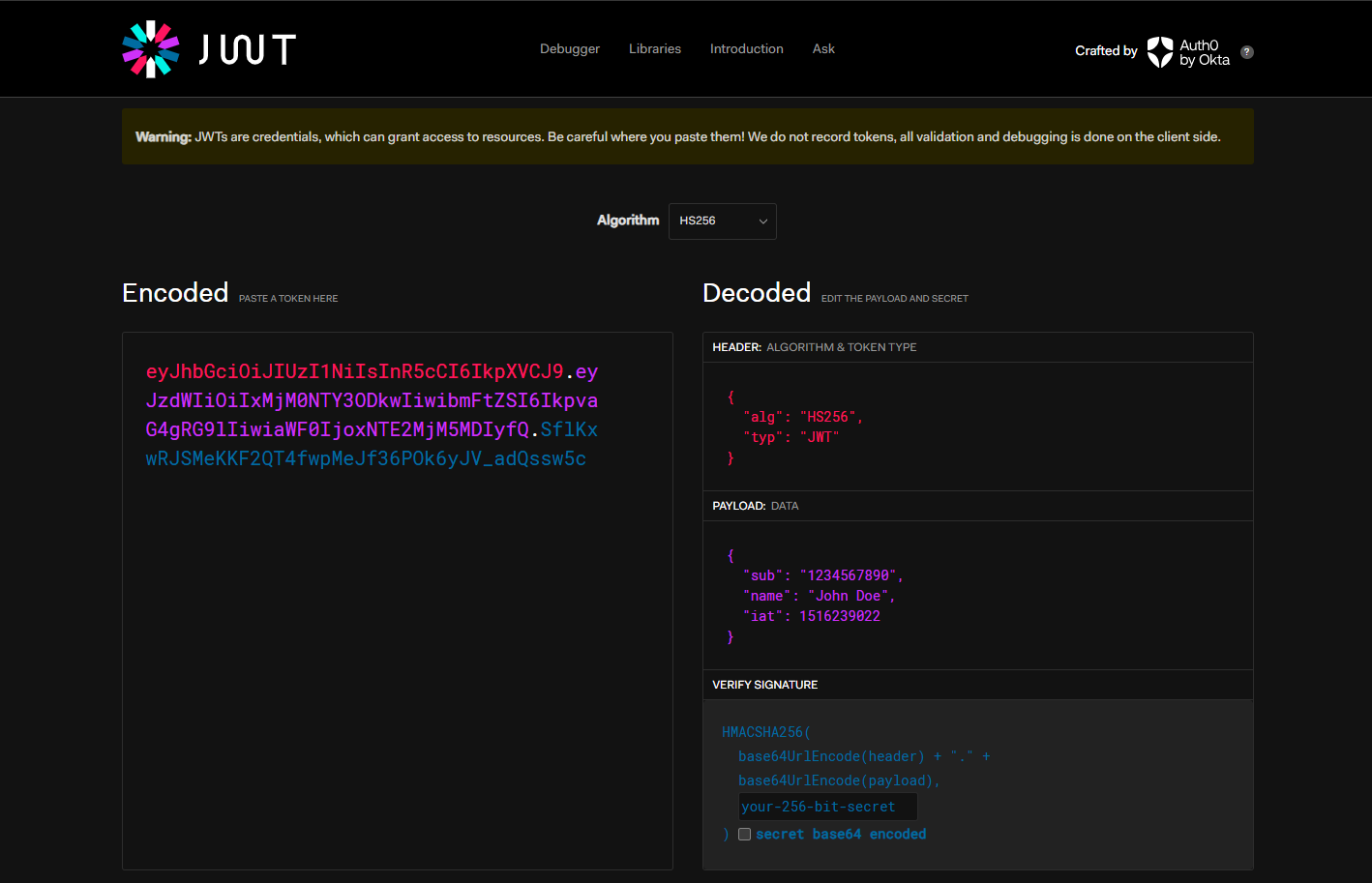
You can see more here: jwt.io
Parts of a JWT token:
A JWT consists of three main parts, each separated by a dot (.). Here's an easy breakdown:
Header
Purpose: The header typically tells us the type of the token, which is JWT, and the algorithm that is used for signing the token, like HMAC SHA256 or RSA.
Example:
{"alg": "HS256", "typ": "JWT"}Explanation: This is a simple
JSONobject that states the JWT is using theHS256algorithm for encryption. It's encoded inBase64Urlformat to make it URL-safe.
Payload
Purpose: The payload contains the
claims.Claimsare statements about an entity (typically, the user) and additional data.Example:
{"sub": "1516239022", "name": "John Doe", "admin": true}Explanation: This JSON object contains information about the user and other metadata. It says that the subject (user) of the JWT has the ID
1516239022, the nameJohn Doe, and has administrative rights.
Signature
Purpose: The signature is used to verify that the sender of the JWT is who it says it is and to ensure that the message wasn't changed along the way.
How It's Made: To create the signature, you take the encoded header, the encoded payload, a secret, the algorithm specified in the header (like HMAC
SHA256), and sign that.Explanation: For example, if you are using the
HMAC SHA256algorithm, the signature will be created by applying theHMAC SHA256algorithm to the combined string ofBase64Urlencoded header and payload, using a secret key.
These three parts together form the JWT: header.payload.signature. When the JWT is sent, it appears as a string of three Base64Url-encoded parts, separated by dots, looking something like this: eyJhbGciOiJIUzI1NiIsInR5cCI6IkpXVCJ9.eyJzdWIiOiIxMjM0NTY3ODkwIiwibmFtZSI6IkpvaG4gRG9lIiwiaWF0IjoxNTE2MjM5MDIyfQ.SflKxwRJSMeKKF2QT4fwpMeJf36POk6yJV_adQssw5c
That's essentially what a JWT is made up of and how each part functions.
Note
JWTs are encoded but not encrypted, making them readable if intercepted. Therefore, avoid storing sensitive data like passwords directly in JWTs, as anyone with access can decode and extract this information.
Note
Instead, JWTs should contain only the necessary information required for user identification and session management, such as user ID or username, and permissions or roles that help with access control decisions. For securing the integrity and authenticity of the token, it is digitally signed using a secret key known only to the server. Even though the contents can be viewed, the signature helps ensure that the token hasn't been altered after it was issued.
Why JWT?
One might wonder: if we can simply use a username and password to access secure endpoints in a web application, why then do we opt for using JWT with Spring Security?
Choosing JWT (JSON Web Tokens) with Spring Security instead of just using usernames and passwords has several benefits, especially for modern web applications:
No Need for Constant Check-ins: JWTs contain all the user information right inside them, so servers can verify who you are without having to ask the database every time you make a request. This is great for handling lots of users because it cuts down on database traffic.
Extra Security: While you still use a username and password to log in, JWT provides a more secure way to keep checking who you are after you're logged in. The tokens are protected and have a built-in expiration time, which helps prevent them from being misused.
Works Everywhere: JWTs are good at working across different systems and devices. This means that once you're logged in to one part of a system, you can use other parts too without having to log in again.
Faster: Because your server isn't always asking the database who you are, things can run faster. With JWT, your server just needs to check the token you send with your requests, which speeds things up.
Carries More Info: JWTs can also include extra details like what permissions you have, which helps the server know what you're allowed to do without having to look it up all the time.
In simple terms, JWT makes things more secure, quicker, and easier to manage, especially when you have lots of users or need to work across different parts of a system. This makes them a strong choice for modern web applications.
In the case of microservices, where there are multiple servers involved:
Tips
JWTs (JSON Web Tokens) are extensively used in microservices architectures, where web applications are built with multiple servers handling different services. In such environments, retrieving usernames and passwords from a specific server every time a user makes a request can be inefficient and slow down the system.
Tips
JWTs address this challenge by encapsulating the user's identity and authorization details within a secure token. This token is issued once, typically after the user logs in, and then used for subsequent requests across different services. This method eliminates the need to continuously query a central authentication server or database, thereby streamlining authentication processes across multiple servers and enhancing overall system performance.
In a microservices setup, where multiple small services work together, JWT (JSON Web Tokens) offer some clear benefits for managing security efficiently:
Independent Verification: Each microservice can check who you are on its own using the information in the JWT. There’s no need to keep asking a central server to verify your identity, which cuts down on delays.
Less Network Traffic: Because JWTs carry all needed user info right inside them, there’s no need for services to constantly talk to each other or to a central database to check user details. This reduces network traffic and speeds things up.
Works Across Services: JWTs are great for setups that stretch over different areas or systems. Once you’re logged in and have a JWT, any service within the system can recognize and trust it.
No Memory Needed: JWTs help keep the system simple because services don’t need to remember user sessions. Everything needed is in the JWT, which supports the stateless operation of microservices.
Overall, JWT makes security smoother, quicker, and more scalable in a microservices architecture, fitting well with the need for each service to operate independently yet securely.
Integrating JWT with Spring Security
In the previous post, we implemented security using basic user and password authentication. In this post, we will replace it with JWT. You can refer to my GitHub link for more details.
To implement JSON Web Tokens (JWT) for authorization in a Spring Boot Maven project, we need to include specific dependencies in our pom.xml file.
<dependencies>
    <dependency>
			<groupId>io.jsonwebtoken</groupId>
			<artifactId>jjwt-api</artifactId>
			<version>0.11.5</version>
		</dependency>
		<dependency>
			<groupId>io.jsonwebtoken</groupId>
			<artifactId>jjwt-impl</artifactId>
			<version>0.11.5</version>
		</dependency>
		<dependency>
			<groupId>io.jsonwebtoken</groupId>
			<artifactId>jjwt-jackson</artifactId>
			<version>0.11.5</version>
		</dependency>
</dependencies>
Explanation for the above dependencies:
1. jjwt-jackson
- What it does: Integrates the Jackson library with JWT operations, optimizing how your Java application encodes and decodes JSON data within JWTs.
2. jjwt-api
- What it does: Supplies the fundamental classes and interfaces for constructing and validating JWTs, providing the building blocks for JWT functionality in Java.
3. jjwt-impl
- What it does: Provides the actual implementation for the interfaces from
jjwt-api, enabling the generation, parsing, and management of JWTs according to your application's security protocols.