Introduction To Docker
People and organizations have driven the demand for new applications to new heights, so the pressure is on to keep up with the demand. The task becomes easier if developers have the right tools. Docker is one such tool, a popular platform dedicated to the development, shipment, and running of applications.
Today, we will look at the best way to start using Docker. But before we get into the nuts and bolts of implementation, let’s refresh our understanding of this versatile and popular platform.
What is Docker?
Docker is an open source software platform used to create, deploy and manage virtualized application. Open your web browser and go to containers on a common operating system (OS), with an ecosystem of allied tools. The container itself is a very lightweight package with all the instructions and dependencies—such as frameworks, libraries, and bins—within it.
Docker gives software developers a faster and more efficient way to build and test containerized portions of an overall software application. This lets developers in a team concurrently build multiple pieces of software. Each container contains all elements needed to build a software component and ensure it's built, tested and deployed smoothly. Docker enables portability for when these packaged containers are moved to different servers or environments.
You can use Docker throughout multiple stages of your DevOps cycle, but it is especially valuable in the deployment stage, especially since it allows developers to use rapid deployment. In addition, the environment itself is highly portable and was designed with efficiencies that will enable you to run multiple Docker containers in a single environment, unlike traditional virtual machine environments.
Difference Between Docker Containers and Virtual Machines
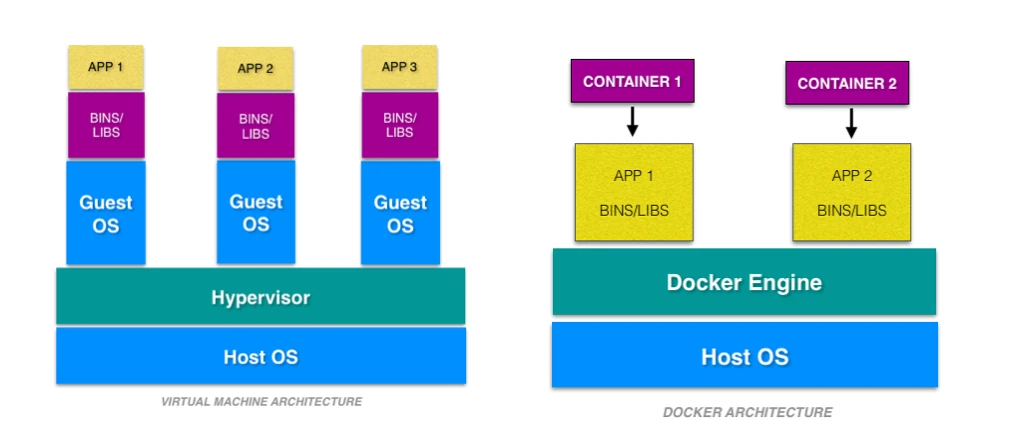
The virtualenvironment has ahypervisor layer, whereasDockerhas aDocker enginelayer.There are additional layers of libraries within the
virtual machine, each of which compounds and creates very significant differences between aDockerenvironment and avirtual machineenvironment.With a
virtual machine, the memory usage is very high, whereas, in aDockerenvironment, memory usage is very low.In terms of performance, when you start building out a
virtual machine, particularly when you have more than onevirtual machineon a server, the performance becomes poorer. WithDocker, the performance is always high because of the singleDocker engine.In terms of portability,
virtual machinesjust are not ideal. They’re still dependent on the host operating system, and a lot of problems can happen when you usevirtual machinesfor portability. In contrast,Dockerwas designed for portability. You can actually build solutions in aDocker container, and the solution is guaranteed to work as you have built it no matter where it’shosted.The boot-up time for a
virtual machineis fairly slow in comparison to the boot-up time for aDockerenvironment, in which boot-up is almost instantaneous.One of the other challenges of using a
virtual machineis that if you have unused memory within the environment, you cannot reallocate it. If you set up an environment that has 9 gigabytes of memory, and 6 of those gigabytes are free, you cannot do anything with that unused memory. WithDocker, if you have free memory, you can reallocate and reuse it across othercontainersused within theDockerenvironment.Another challenge of
virtual machinesis that running multiples of them in a single environment can lead to instability and performance issues.Docker, on the other hand, is designed to runmultiple containersin the same environment—it actually gets better with morecontainersrun in thathostedsingleDocker engine.Virtual machineshave portability issues; the software can work on one machine, but if you move that virtual machine to another machine, suddenly some of the software won’t work, because some dependencies will not be inherited correctly.Dockeris designed to be able to run across multiple environments and to be deployed easily across systems.The boot-up time for a virtual machine is about a few minutes, in contrast to the milliseconds it takes for a
Dockerenvironment to boot up.
Why Docker is popular?
Docker gained its popularity due to its impact on the software development and deployment. The following are the some of the main reasons for docker becoming popular:
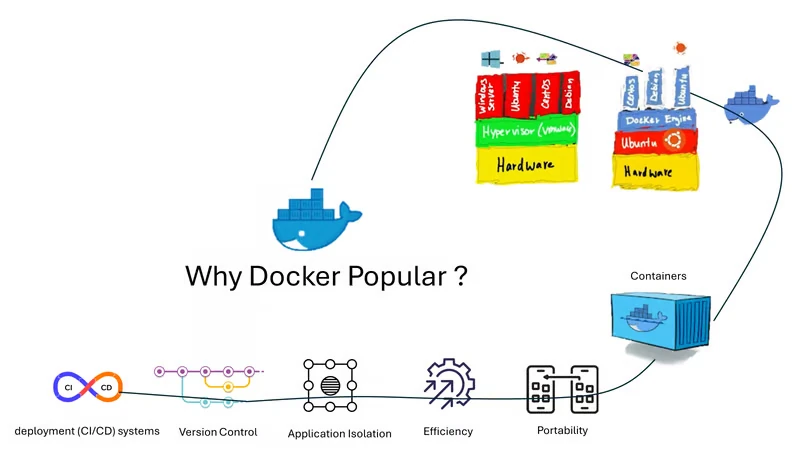
Portability:
Dockerfacilitates the developers in packaging their applications with all dependencies into a single lightweightcontainers. It facilities in ensuring the consistent performance across the different computing environments.Reproducibility: Through encapsulating the applications with their dependencies within a container it ensures in software setups remaining consistent across the development, testing and production environments.
Efficiency:
Dockerthrough its container based architecture it optimizes the resource utilization. It allows the developers to run the multiple isolated applications on a single host system.Scalability:
Docker’sscalability features facilitated the developers in making easier of their applications handling at time of workloads increment.
Docker Core Architecture
The following sections will look at the Docker architecture and its associated components. We will also look at how each component works together to make Docker work.
Docker architecture has changed a few times since its inception. When I published the first version of this article, Docker was built on top of LXC.
Here are some notable architectural changes that happened for the Docker:
Dockermoved from LXC to libcontainer in 2014runc – a
CLIfor spinning up containers that follow allOCIspecifications.containerd –
Dockerseparated its container management component tocontainerdin 2016
Tips
OCI: Open Container Initiative is an open industry standard for container runtime and specifications.
When Docker was initially launched, it had a monolithic architecture. Now it is separated into the following three different components.
Docker Engine (dockerd)
docker-containerd (containerd)
docker-runc (runc)
Docker and other big organizations contributed to a standard container runtime and management layers. Hence containerd and runc are now part of the Cloud Native Foundation with contributors from all the organizations.
Tips
Note: When installing Docker, all these components get installed. You don’t have to install it separately. For exaplanation, we are showing it as different components.
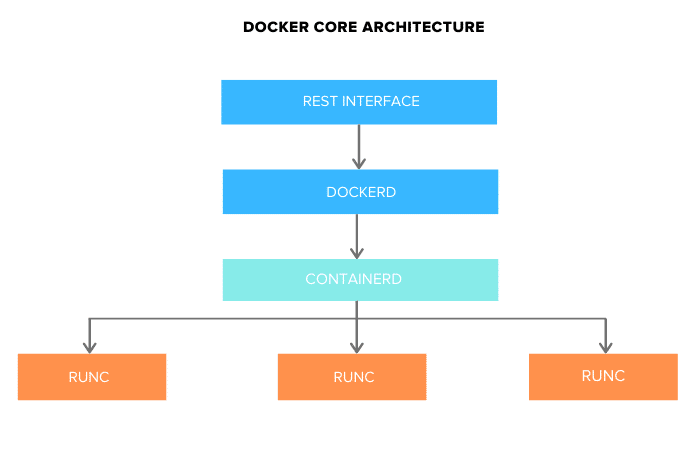
Docker Engine
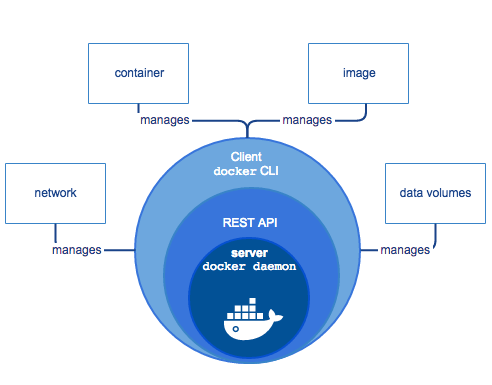
Docker engine comprises the docker daemon, an API interface, and Docker CLI. Docker daemon (dockerd) runs continuously as dockerd systemd service. It is responsible for building the docker images.
To manage images and run containers, dockerd calls the docker-containerd APIs.
Docker-containerd (containerd)
containerd is another system daemon service than is responsible for downloading the docker images and running them as a container. It exposes its API to receive instructions from the dockerd service
Docker-runc
runc is the container runtime responsible for creating the namespaces and cgroups required for a container. It then runs the container commands inside those namespaces. runc runtime is implemented as per the OCI specification.
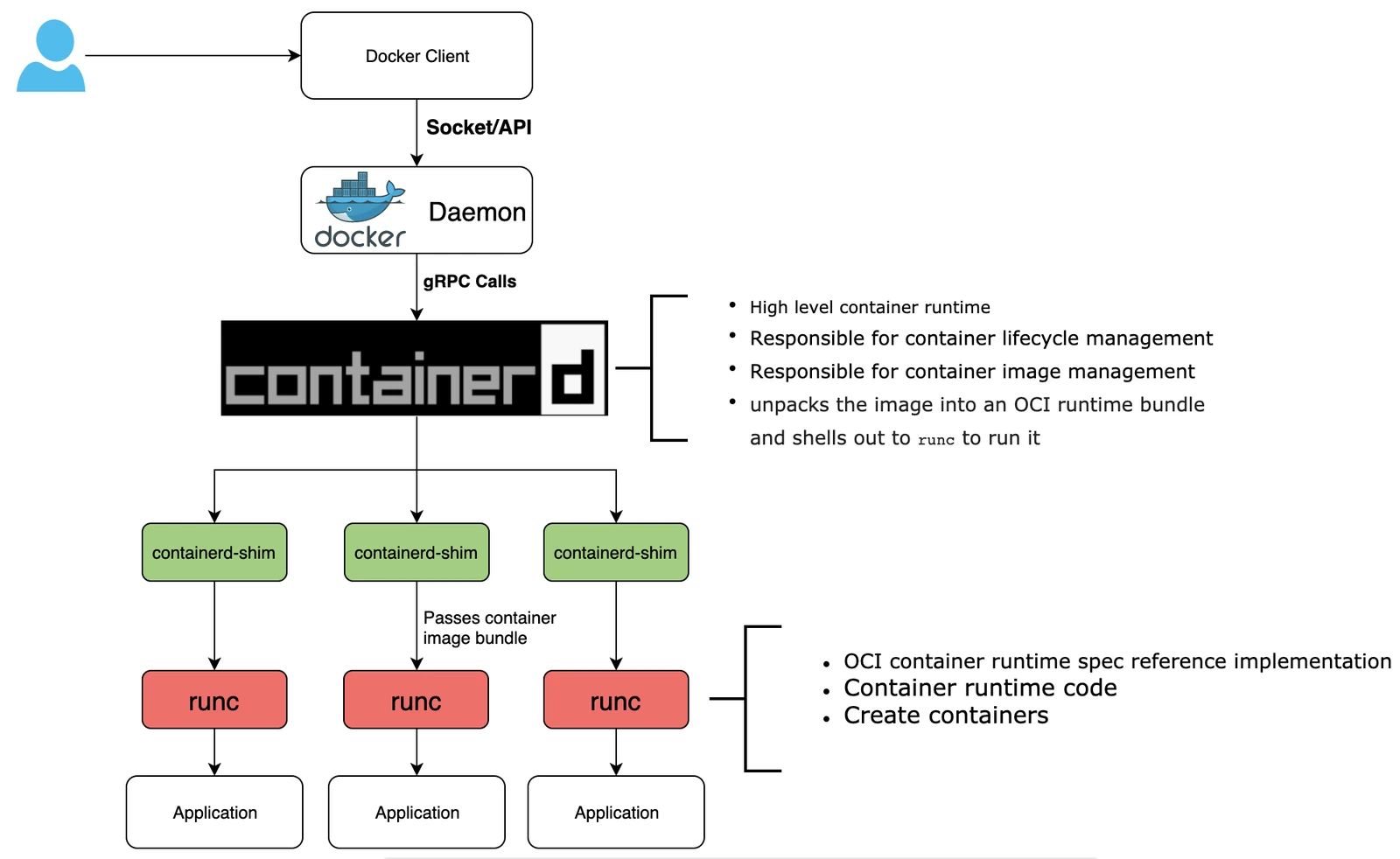
How Docker works
Docker works via a Docker engine that is composed of two key elements: a server and a client and the communication between the two is via REST API. The server communicates the instructions to the client. On older Windows and Mac systems, you can take advantage of the Docker toolbox, which allows you to control the Docker engine using Compose and Kitematic.
Key Components of Docker
The following official high-level docker architecture diagram shows the common Docker workflow.
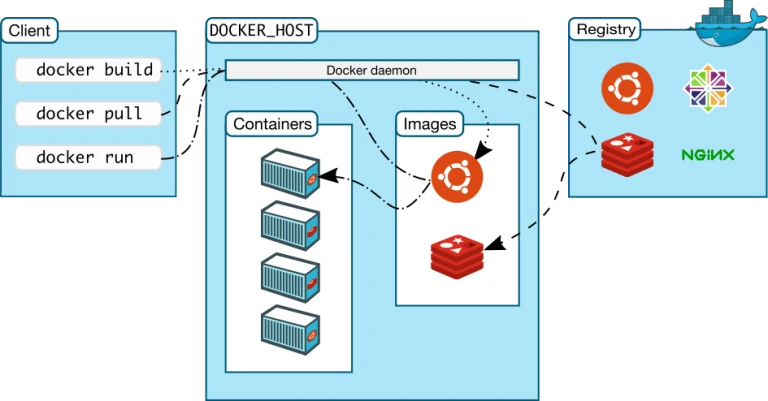
Docker ecosystem is composed of the following five components:
Docker Daemon (dockerd)
Docker client and server
Docker Images
Docker Registries
Docker Containers
What is a Docker Daemon
Docker has a client-server architecture. Docker Daemon (dockerd) or server is responsible for all the actions related to containers.
The daemon receives the commands from the Docker client through CLI or REST API. Docker client can be on the same host as a daemon or present on any other host.
By default, the docker daemon listens to the docker.sock UNIX socket. If you have any use case to access the docker API remotely, you need to expose it over a host port
If you want to run Docker inside Docker, you can use the docker.sock from the host machine.
What is a Docker Image
Images are the basic building blocks of Docker. It contains the OS libraries, dependencies, and tools to run an application.
The Docker image is built within the YAML file and then hosted as a file in the Docker registry.
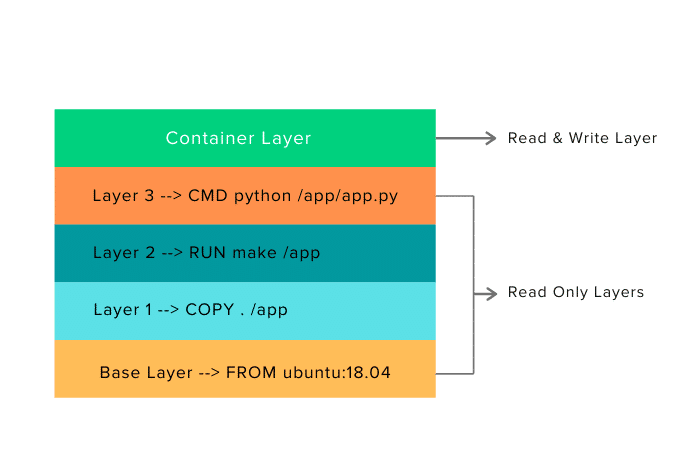
The image has several key layers, and each layer depends on the layer below it.
Image layers are created by executing each command in the Dockerfile and are in the read-only format.
You start with your base layer, which will typically have your base image and your base operating system, and then you will have a layer of dependencies above that.
These then comprise the instructions in a read-only file that would become your Dockerfile.
What is a Docker File
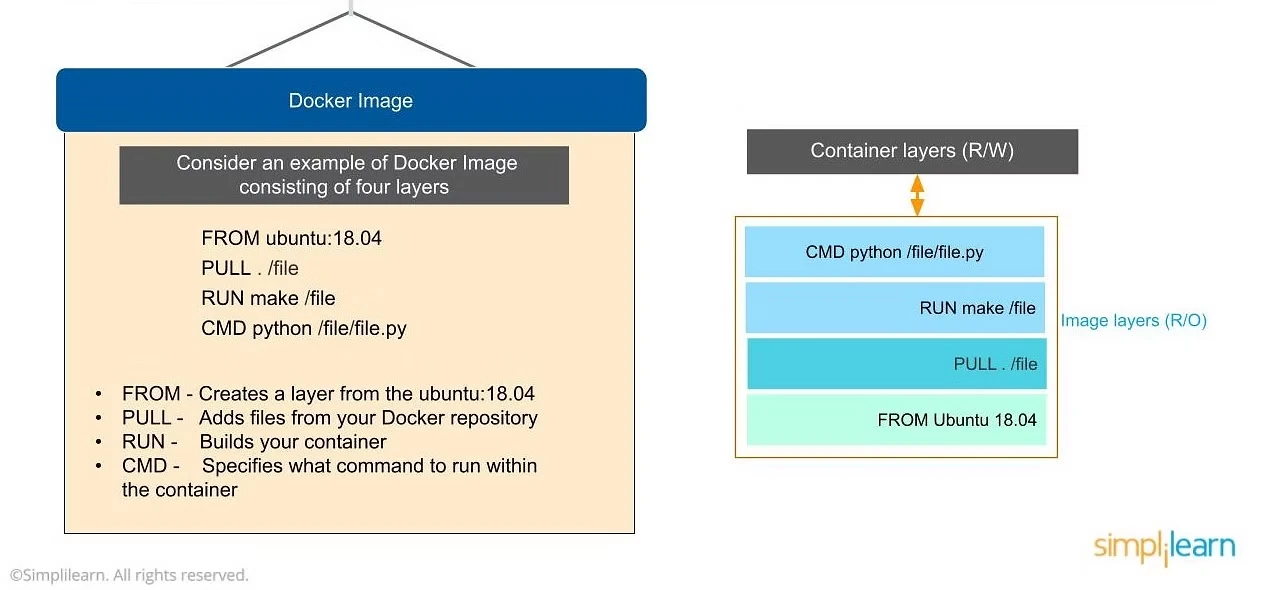
From command creates a layer based on
Ubuntu, and then we add files from theDocker repositoryto the base command of that base layer.Pull: Adds files from your
Docker repositoryRun: Builds your
containerCMD: Specifies which command to run within the
container
In this instance, the command is to run Python. One of the things that will happen as we set up multiple containers is that each new container adds a new layer with new images within the Docker environment. Each container is completely separate from the other containers within the Docker environment, so you can create your own separate read-write instructions within each layer. What’s interesting is that if you delete a layer, the layer above it will also get deleted.
What happens when you pull in a layer but something changes in the core image? Interestingly, the main image itself cannot be modified. Once you’ve copied the image, you can modify it locally. You can never modify the actual base image.
The top layer of an image is writable and used by the running container. Other layers in the image are read-only.
What is Docker Registry
It is a repository (storage) for Docker images.
A registry can be public or private. For example, Docker Inc provides a hosted registry service called Docker Hub. It allows you to upload and download images from a central location.
Note
By default, when you install docker, it looks for images from the public Docker hub unless you specify a custom registry in Docker settings.
Other Docker hub users can access all your images if your repository is public. You can also create a private registry in Docker Hub.
Docker hub acts like git, where you can build your images locally on your laptop, commit it, and then be pushed to the Docker hub.
Tips
When using docker in enterprise networks/project, set up your own docker registries instead of using the public docker hub. All cloud providers have their own container registry services.
What is a Docker Container
Docker Containers are created from existing images. It is a writable layer of the image.
If you try to relate image layers and a container, here is how it looks for a ubuntu-based image.
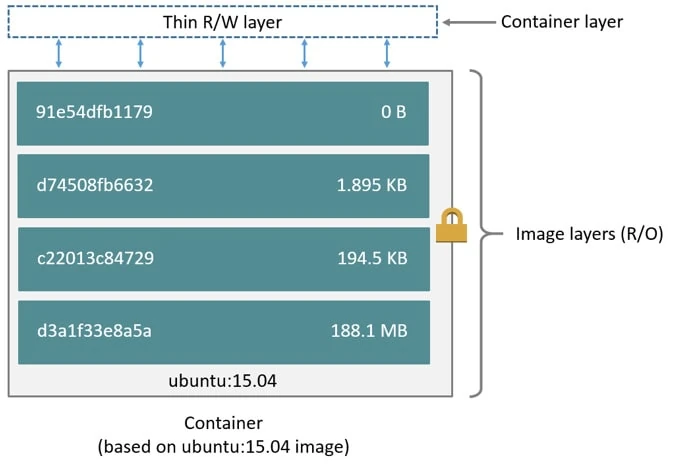
You can package your applications in a container, commit it, and make it a golden image to build more containers from it.
Containers can be started, stopped, committed, and terminated. If you terminate a container without committing it, all the container changes will be lost.
Ideally, containers are treated as immutable objects, and it is not recommended to make changes to a running container. Instead, make changes to a running container only for testing purposes.
Two or more containers can be linked together to form tiered application architecture. However, hosting hight scalable applications with Docker has been made easy with the advent of container orchestration tools like kubernetes.
Advanced Docker Components
After going through the various components of Docker, the next focus of this Docker tutorial are the advanced components of Docker:
Docker compose
Docker swamp
Docker Compose
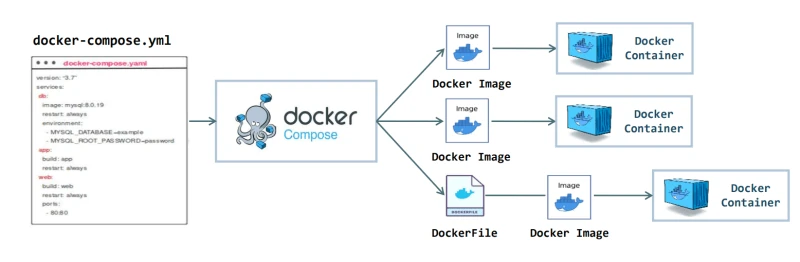
Docker compose is designed for running multiple containers as a single service. It does so by running each container in isolation but allowing the containers to interact with one another. As noted earlier, you would write the compose environments using YAML.
So in what situations might you use Docker compose? An example would be if you are running an Apache server with a single database and you need to create additional containers to run additional services without having to start each one separately. you would write a set of files using Docker compose to do that.
Docker Swarm
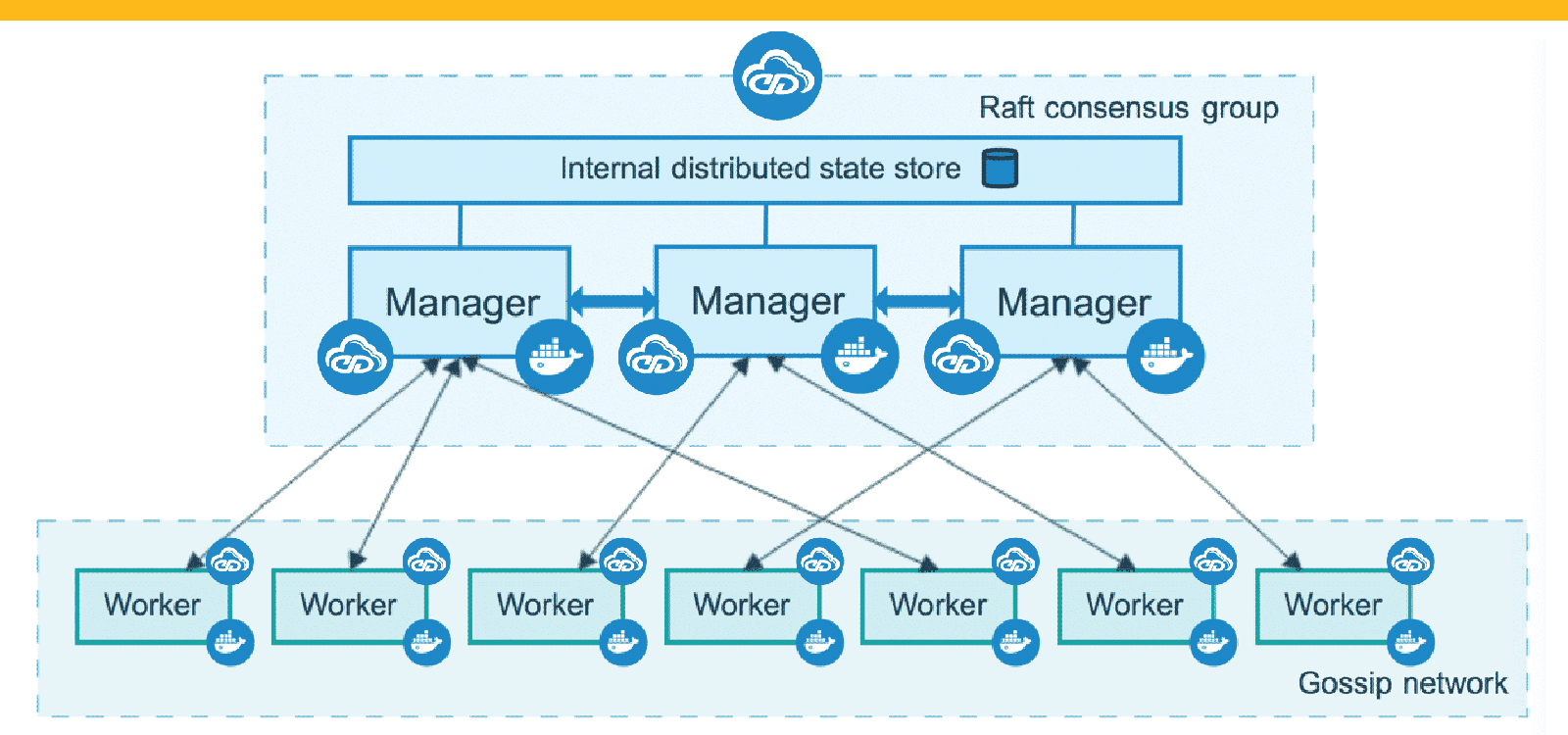
Docker swarm is a service for containers that allows IT administrators and developers to create and manage a cluster of swarm nodes within the Docker platform. Each node of Docker swarm is a Docker daemon, and all Docker daemons interact using the Docker API.
A swarm consists of two types of nodes: a manager node and a worker node. A manager node maintains cluster management tasks. Worker nodes receive and execute tasks from the manager node.
Docker Desktop
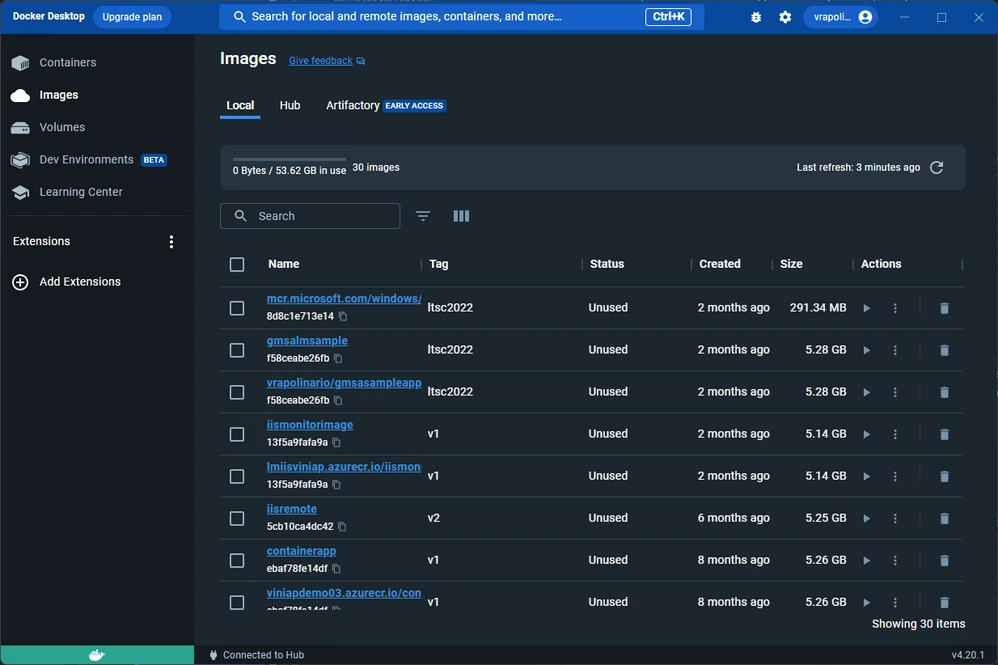
It’s easy to get overwhelmed by terminology, and some people may wonder if Docker (also known as Docker Engine) and Docker Desktop are different things. However, the two entities aren’t the same. Docker Desktop is a free, easy-to-install, downstream application for a Mac or Windows environment. The application lets you build and share containerized applications and microservices. Docker consists of Docker Engine, Docker Compose, Docker CLI client, Docker Content Trust, Kubernetes, and Credential Helper.
Docker Desktop functions well with any developer’s choice of tools and languages and gives access to a massive library of certified images and templates residing in Docker Hub. These resources help development teams extend their environment to rapidly auto-build, continuously integrate, and collaborate with a secure repository.
So, to recap, Docker Engine is the client-server technology used to build and run containers and is often referred to as “Docker.”
Additionally, people use “Docker” to refer to the company itself. On the other hand, Docker Desktop is a free application that bundles together numerous Docker resources.
What is Docker used for?
Thanks to its flexible nature, Docker has various use cases. Below are some example ways in which application developers use Docker:
Deploying microservices.
Dockersupports the microservice approach to app development by offering a simple way to connect components using its built-in container networking features.Software testing.
Docker containersprovide a quick way to start and stop the applications and allow quick iteration between different app versions.Deploying database containers. Running a database
containeralongside an appcontainersimplifies database management. It ensures the app can create and use the database even if the relevantDBMSis not installed on the host system.Accessing tools without having to install them. App development often requires tools that are used only once in the process. Using a
containerizedversion of a tool provides easy access to its functionality without installing it.Creating easily deployable app stacks.
Docker Composeallows users to create a single file to deploy a set ofcontainerizedapps. This feature is particularly useful in development, where tool stacks are extensively used.
Docker FAQs
The following section contains frequently asked questions regarding Docker's design and usage.
What is the difference between containerd & runc?
containerd is responsible for managing the container and runc is responsible for running the containers (create namespaces, cgroups and run commands inside the container) with the inputs from containerd
What is the difference between the Docker engine & the Docker daemon?
Docker engine is composed of the docker daemon, rest interface, and the docker CLI. Docker daemon is the systemd dockerd service responsible for building the docker images and sending docker instructions to containerd runtime
Conclusion
By now, you should have a good understanding of what Docker is and how it works.
The best feature of Docker is collaboration. Docker images can be pushed to a repository and pulled down to any other host to run containers from that image.
Moreover, the Docker hub has thousands of images created by users, and you can pull those images down to your hosts based on your application requirements. Also, it is primarily used in container orchestration tools like kubernetes