Introduction To Containers
If you’re a programmer or techie, chances are you’ve at least heard of Docker: a helpful tool for packing, shipping, and running applications within “containers.”. It’d be hard not to, with all the attention it’s getting these days — from developers and system admins alike. Even the big dogs like Google, VMware and Amazon are building services to support it. Regardless of whether or not you have an immediate use-case in mind for Docker, I still think it’s important to understand some of the fundamental concepts around what a “container” is and how it compares to a Virtual Machine (VM).
Let’s start by understanding what VMs and containers even are.
What are “containers” and “VMs”?
Containers and VMs are similar in their goals: to isolate an application and its dependencies into a self-contained unit that can run anywhere.
Moreover, containers and VMs remove the need for physical hardware, allowing for more efficient use of computing resources, both in terms of energy consumption and cost effectiveness.
The main difference between containers and VMs is in their architectural approach. Let’s take a closer look.
Virtual Machines
A VM is essentially an emulation of a real computer that executes programs like a real computer. VMs run on top of a physical machine using a “hypervisor”. A hypervisor, in turn, runs on either a host machine or on “bare-metal”.
A Hypervisor is a piece of software, firmware, or hardware that VMs run on top of. The hypervisors themselves run on physical computers, referred to as the “host machine”. The host machine provides the VMs with resources, including RAM and CPU. These resources are divided between VMs and can be distributed as you see fit. So if one VM is running a more resource heavy application, you might allocate more resources to that one than the other VMs running on the same host machine.
The VM that is running on the host machine (again, using a hypervisor) is also often called a “guest machine.”. This guest machine contains both the application and whatever it needs to run that application (e.g. system binaries and libraries). It also carries an entire virtualized hardware stack of its own, including virtualized network adapters, storage, and CPU — which means it also has its own full-fledged guest operating system. From the inside, the guest machine behaves as its own unit with its own dedicated resources. From the outside, we know that it’s a VM — sharing resources provided by the host machine.
As mentioned above, a guest machine can run on either a hosted hypervisor or a bare-metal hypervisor. There are some important differences between them.
First off, a hosted virtualization hypervisor runs on the operating system of the host machine. For example, a computer running OSX can have a VM (e.g. VirtualBox or VMware Workstation 8) installed on top of that OS. The VM doesn’t have direct access to hardware, so it has to go through the host operating system (in our case, the Mac’s OSX).
The benefit of a hosted hypervisor is that the underlying hardware is less important. The host’s operating system is responsible for the hardware drivers instead of the hypervisor itself, and is therefore considered to have more “hardware compatibility.” On the other hand, this additional layer in between the hardware and the hypervisor creates more resource overhead, which lowers the performance of the VM.
A bare metal hypervisor environment tackles the performance issue by installing on and running from the host machine’s hardware. Because it interfaces directly with the underlying hardware, it doesn’t need a host operating system to run on. In this case, the first thing installed on a host machine’s server as the operating system will be the hypervisor. Unlike the hosted hypervisor, a bare-metal hypervisor has its own device drivers and interacts with each component directly for any I/O, processing, or OS-specific tasks. This results in better performance, scalability, and stability. The tradeoff here is that hardware compatibility is limited because the hypervisor can only have so many device drivers built into it.
Well, since the VM has a virtual operating system of its own, the hypervisor plays an essential role in providing the VMs with a platform to manage and execute this guest operating system. It allows for host computers to share their resources amongst the virtual machines that are running as guests on top of them.
As you can see in the diagram, VMs package up the virtual hardware, a kernel (i.e. OS) and user space for each new VM.
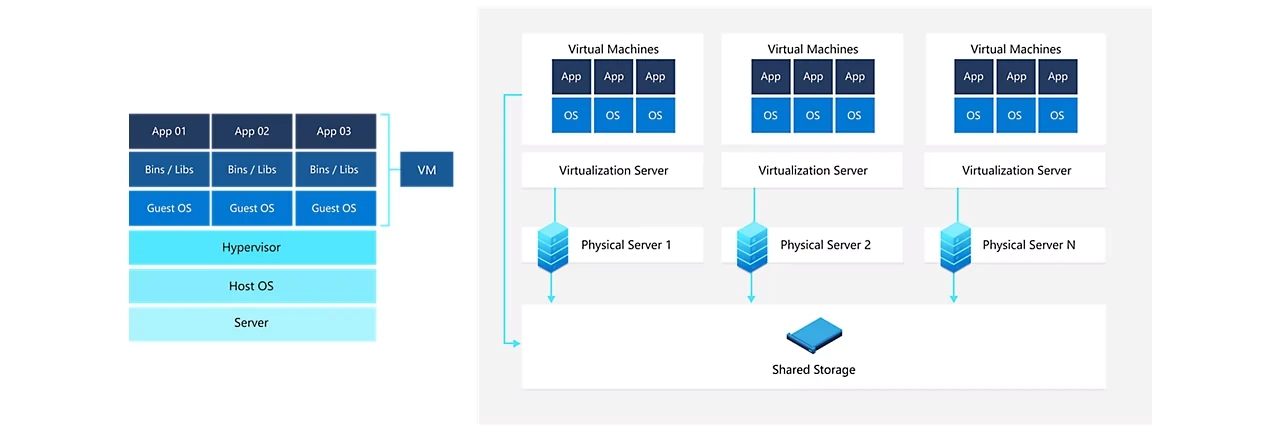
As you can see in the diagram, VMs package up the virtual hardware, a kernel (i.e. OS) and user space for each new VM.
Container
The first thing that comes to our mind when we hear Containers is the Docker Container. The Docker container has become an industry standard for containerization. However, LXC (Linux Container) was the first implementation of containerization technology. It leveraged the Linux cgroups and namespace isolation to create light-weight containers.In fact, the initial version of Docker was directly built on top of LXC. Similar to docker, there are other containers such as rocket & containerd.
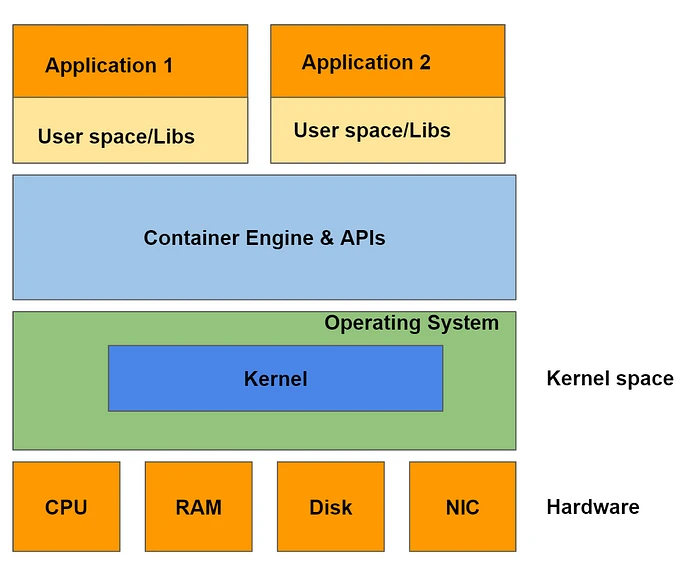
Containers overcome all the shortcomings of Virtual Machines. Containers don't require the installation of a separate guest operating system. They directly run and use the host operating system. Containers only need the dependent file system and binaries for their functioning. For eg:- A java app while running inside a container will need Java Runtime Environment (JRE). As a result, containers are lightweight as compared to Virtual Machines.
Let's assume that you are running a ticket booking system. And it's currently running on a virtual machine. In case there is a spike in user requests, you will have to scale your system. Hence, you would need to launch multiple VM instances. Launching a VM is an expensive & time taking operation. You may notice latency spikes while scaling virtual machines.
We can avoid the above latency spike using containers. Containers are light-weight, cheap, and can be easily launched. Thus, you can scale your systems easily & improve responsiveness and performance.
Containers vs Virtual Machine
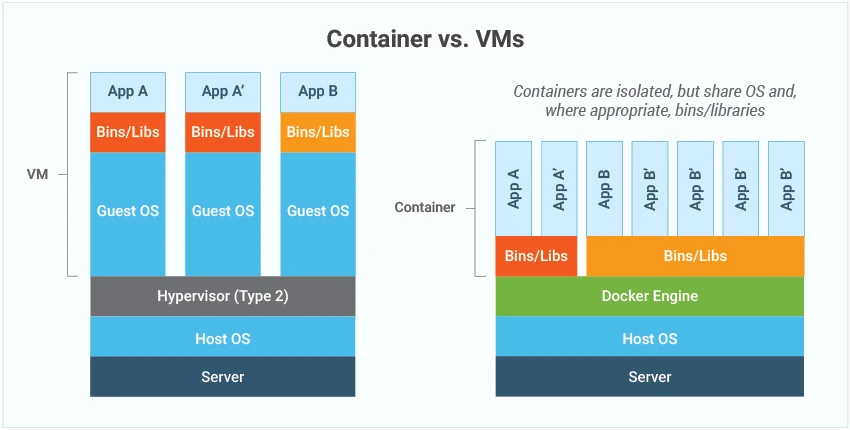
Containers and virtual machines are both technologies used to isolate applications and their dependencies, but they have some key differences:
Resource Utilization:
Containersshare the host operating system kernel, making them lighter and faster thanVMs.VMshave a full-fledgedOSand hypervisor, making them more resource-intensive.Portability:
Containersare designed to be portable and can run on any system with a compatible host operating system.VMsare less portable as they need a compatible hypervisor to run.Security:
VMsprovide a higher level of security as eachVMhas its own operating system and can be isolated from the host and otherVMs. Containers provide less isolation, as they share the host operating system.Management: Managing containers is typically easier than managing
VMs, as containers are designed to be lightweight and fast-moving.
Why are containers useful?
Portability – the isolated environment that containers provide effectively means the container is decoupled from the environment in which they run. Basically, they don’t care much about the environment in which they run, which means they can be run in many different environments with different operating systems and hardware platforms.
Consistency – since the containers are decoupled from the environment in which they run, you can be sure that they operate the same, regardless of where they are deployed. The isolated environment that they provide is the same across different deployment environments.
Speed to deploy – for the same reasons as above. There is no need for considerations around how the application will operate in a production environment. If it runs in a
containerin one environment (say, your local machine), then it can be made to run in acontainerin another environment (say, in a cloud provider) very quickly
Why are containers light weight ?
Containers are lightweight because they use a technology called containerization, which allows them to share the host operating system's kernel and libraries, while still providing isolation for the application and its dependencies. This results in a smaller footprint compared to traditional virtual machines, as the containers do not need to include a full operating system. Additionally, Docker containers are designed to be minimal, only including what is necessary for the application to run, further reducing their size.
Let's try to understand this with an example:
Below is the screenshot of official ubuntu base image which you can use for your container. It's just ~ 22 MB, isn't it very small ? on a contrary if you look at official ubuntu VM image it will be close to ~ 2.3 GB. So the container base image is almost 100 times less than VM image.
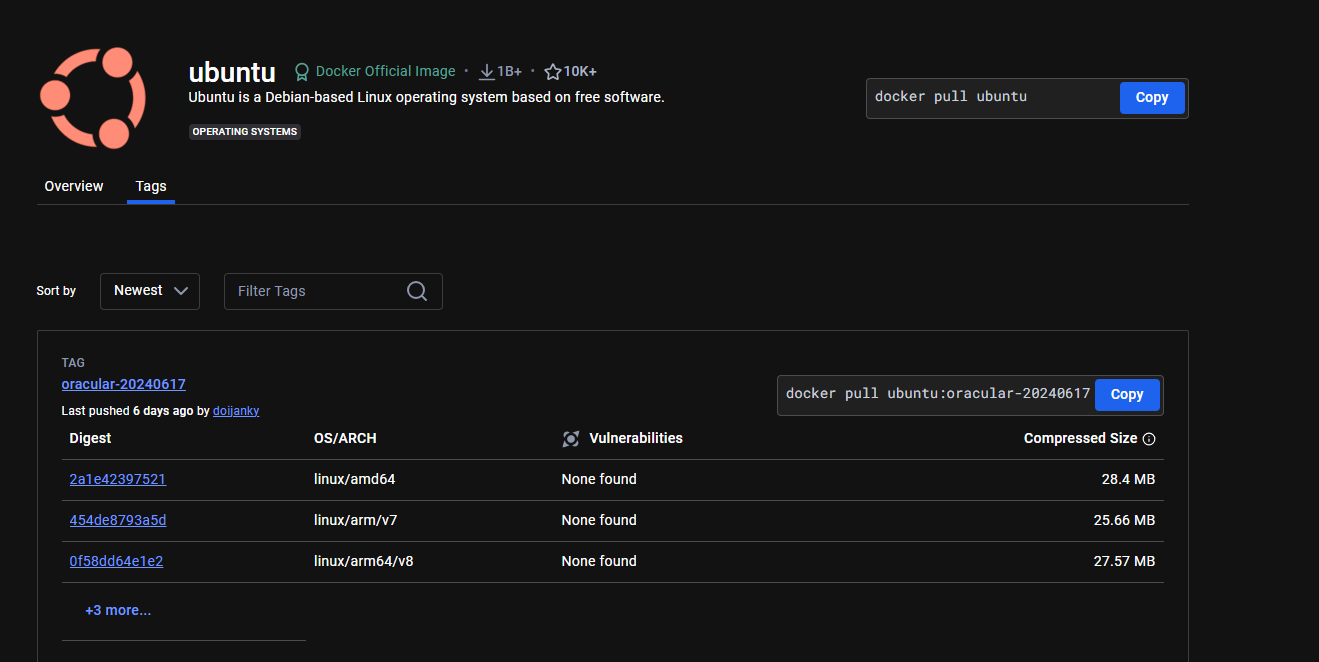
To provide a better picture of files and folders that containers base images have and files and folders that containers use from host operating system (not 100 percent accurate -> varies from base image to base image). Refer below.
Files and Folders in containers base images
/bin: contains binary executable files, such as the ls, cp, and ps commands.

/sbin: contains system binary executable files, such as the init and shutdown commands.

/etc: contains configuration files for various system services.

/lib: contains library files that are used by the binary executables.

/usr: contains user-related files and utilities, such as applications, libraries, and documentation.

/var: contains variable data, such as log files, spool files, and temporary files.

/root: is the home directory of the root user.
Files and Folders that containers use from host operating system
The host's file system: Docker containers can access the host file system using bind mounts, which allow the container to read and write files in the host file system.

Networking stack: The host's networking stack is used to provide network connectivity to the container. Docker containers can be connected to the host's network directly or through a virtual network.

System calls: The host's kernel handles system calls from the container, which is how the container accesses the host's resources, such as CPU, memory, and I/O.

Namespaces: Docker containers use Linux namespaces to create isolated environments for the container's processes. Namespaces provide isolation for resources such as the file system, process ID, and network.

Control groups (cgroups): Docker containers use cgroups to limit and control the amount of resources, such as CPU, memory, and I/O, that a container can access.
It's important to note that while a container uses resources from the host operating system, it is still isolated from the host and other containers, so changes to the container do not affect the host or other containers.
Note: There are multiple ways to reduce your VM image size as well, but I am just talking about the default for easy comparision and understanding.
So, in a nutshell, container base images are typically smaller compared to VM images because they are designed to be minimalist and only contain the necessary components for running a specific application or service. VMs, on the other hand, emulate an entire operating system, including all its libraries, utilities, and system files, resulting in a much larger size.
I hope it is now very clear why containers are light weight in nature.
Good luck and get containerizing! Leave any questions/feedback/comments in the comment area below ❤️